Magic Leaf: A Versatile Display Font for Modern Web Design
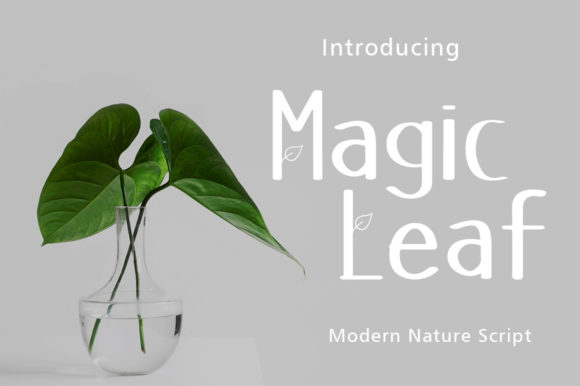
As a web designer, I’m always on the lookout for display fonts that can elevate a layout without compromising readability. Magic Leaf is one of those rare typefaces that strikes a perfect balance between character and clarity. It’s a lettered display font with a clean, approachable feel that works across a variety of digital contexts—from landing page headers to brand-focused content sections.
Why Magic Leaf Stands Out in Web Design
Magic Leaf brings a friendly, slightly whimsical tone to any layout. Its lettered style gives it a hand-crafted appeal without the messiness that can distract from usability. This makes it ideal for web designers looking to add personality without sacrificing legibility, especially on screens where clarity is key.
Whether you're designing a creative portfolio, a boutique online store, or a product landing page, Magic Leaf adds a visual hook that draws users in. It performs especially well in hero sections, call-to-action buttons, and short brand statements where a touch of warmth and originality is needed.
Best Use Cases for Magic Leaf in Digital Projects
- Hero Titles: The font’s open spacing and clean lines make it easy to read even at large sizes, perfect for impactful headlines.
- Section Headings: Use Magic Leaf to create visual breaks and guide users through content with a soft, inviting tone.
- Call-to-Action Buttons: Its rounded edges and legible structure help convert clicks by feeling both trustworthy and approachable.
- Logo Text: For brands with a playful or creative identity, Magic Leaf can be a strong choice for logotypes or taglines.
- Blog Headers & Social Media Graphics: Enhance your content visuals with a font that feels modern yet personal.
Readability and Visual Hierarchy
One of the most important considerations in web design is how a font supports readability and scanning behavior. Magic Leaf is designed with enough character to stand out but maintains a neutral enough structure to avoid overwhelming the user. It works well in both light and dark themes, especially when used on image overlays with sufficient contrast.
On mobile screens, where space is limited, Magic Leaf performs best when used sparingly—such as in section headers or short phrases. Avoid using it for long paragraphs or small buttons where detail can get lost. Instead, pair it with a clean sans serif for body text to maintain a balanced visual hierarchy.
Font Pairing Tips for Magic Leaf
Because Magic Leaf is a decorative display font, it shines brightest when paired with a more neutral typeface. Here are some pairing strategies:
- Sans Serif for Body Copy: Pair Magic Leaf with a modern sans serif like Montserrat or Open Sans to keep layouts clean and readable.
- Serif for Editorial Design: For blog headers or content-driven sites, try pairing with a serif like Merriweather to create contrast and sophistication.
- Minimalist Script for Accents: If you're designing a wedding website or boutique brand kit, a light script font can complement Magic Leaf’s warmth.
Brand Identity and Consistency
Fonts are one of the most powerful tools in shaping brand tone. Magic Leaf’s friendly, slightly retro style makes it a great fit for brands that want to feel accessible, creative, and authentic. Whether you're building a coaching website, a digital course landing page, or a small online shop, this font can help reinforce a consistent and memorable brand voice.
Consistency is key across digital touchpoints. Using Magic Leaf across your headers, social media graphics, and promotional banners ensures a unified visual language that users will recognize and trust.
Technical Considerations for Web Use
Before implementing Magic Leaf into a live project, it’s important to check its technical specs. Make sure the font includes multiple weights and styles for flexibility. Look for webfont formats like WOFF and WOFF2, which are optimized for performance and compatibility.
If you're designing for a global audience, verify that the font supports multiple languages and special characters. Some display fonts may lack extended glyph sets, which can limit their usability in international projects.
Licensing and Commercial Use
When using Magic Leaf for client work, online stores, landing pages, or digital templates, always ensure you have the proper commercial license. Many premium fonts come with usage restrictions, so it’s important to read the license agreement carefully before deployment.
For SaaS founders and digital product creators, having a clear font licensing policy is not just about compliance—it’s also about protecting your brand assets and ensuring long-term usability across platforms and devices.
Final Thoughts
Magic Leaf is more than just a pretty font—it’s a practical tool for web designers and digital creators who want to inject warmth and personality into their projects without sacrificing usability. From landing pages to brand kits, this display font offers a flexible, engaging solution that supports both visual design and user experience.